# รู้จัก NetBird — Zero-Trust Networking ที่ใช้ WireGuard แทน VPN เดิมๆ
Table of Contents
VPN เดิมๆ มีปัญหาอะไร
VPN แบบดั้งเดิมอย่าง OpenVPN หรือ IPSec มีปัญหาหลักๆ ที่เจอบ่อย:
- Hub-and-spoke bottleneck — traffic ทุกอย่างต้องวิ่งผ่าน VPN server กลาง ถ้า server อยู่ไกลหรือ bandwidth จำกัด ก็ช้าไปหมด
- Config ยุ่งยาก — ต้อง generate certificate, แจก config file ทีละคน ยิ่ง scale ยิ่งปวดหัว
- ไม่มี SSO แบบ native — ส่วนใหญ่ต้อง manage user/password เอง หรือต่อ LDAP แบบ hacky
- All-or-nothing access — เข้า VPN ได้ = เข้าถึง network ทั้งหมด ไม่มี granular control ว่าใครเข้าอะไรได้บ้าง
- NAT traversal ลำบาก — client อยู่หลัง CGNAT ก็ต่อไม่ได้ ต้อง port forward
ปัญหาเหล่านี้ทำให้ zero-trust networking เป็นทางออกที่ดีกว่าสำหรับทีมยุคใหม่
NetBird คืออะไร
NetBird เป็น open-source zero-trust networking platform ที่สร้างบน WireGuard ทำให้เครื่องต่างๆ เชื่อมต่อกันแบบ peer-to-peer mesh network โดยไม่ต้องผ่าน central server
หลักการทำงานง่ายๆ:
- ติดตั้ง NetBird client บนทุกเครื่องที่ต้องการเชื่อมต่อ
- Client จะ register กับ Management Service เพื่อรับ config และ peer list
- เครื่องที่ต้องการคุยกันจะพยายามเชื่อมต่อแบบ P2P โดยตรง ผ่าน WireGuard tunnel
- ถ้า P2P ไม่สำเร็จ (เช่น อยู่หลัง strict NAT) จะ fallback ไปใช้ Relay server แทน
Architecture แบบง่ายๆ
NetBird มี architecture ที่แบ่ง control plane กับ data plane ออกจากกันชัดเจน:
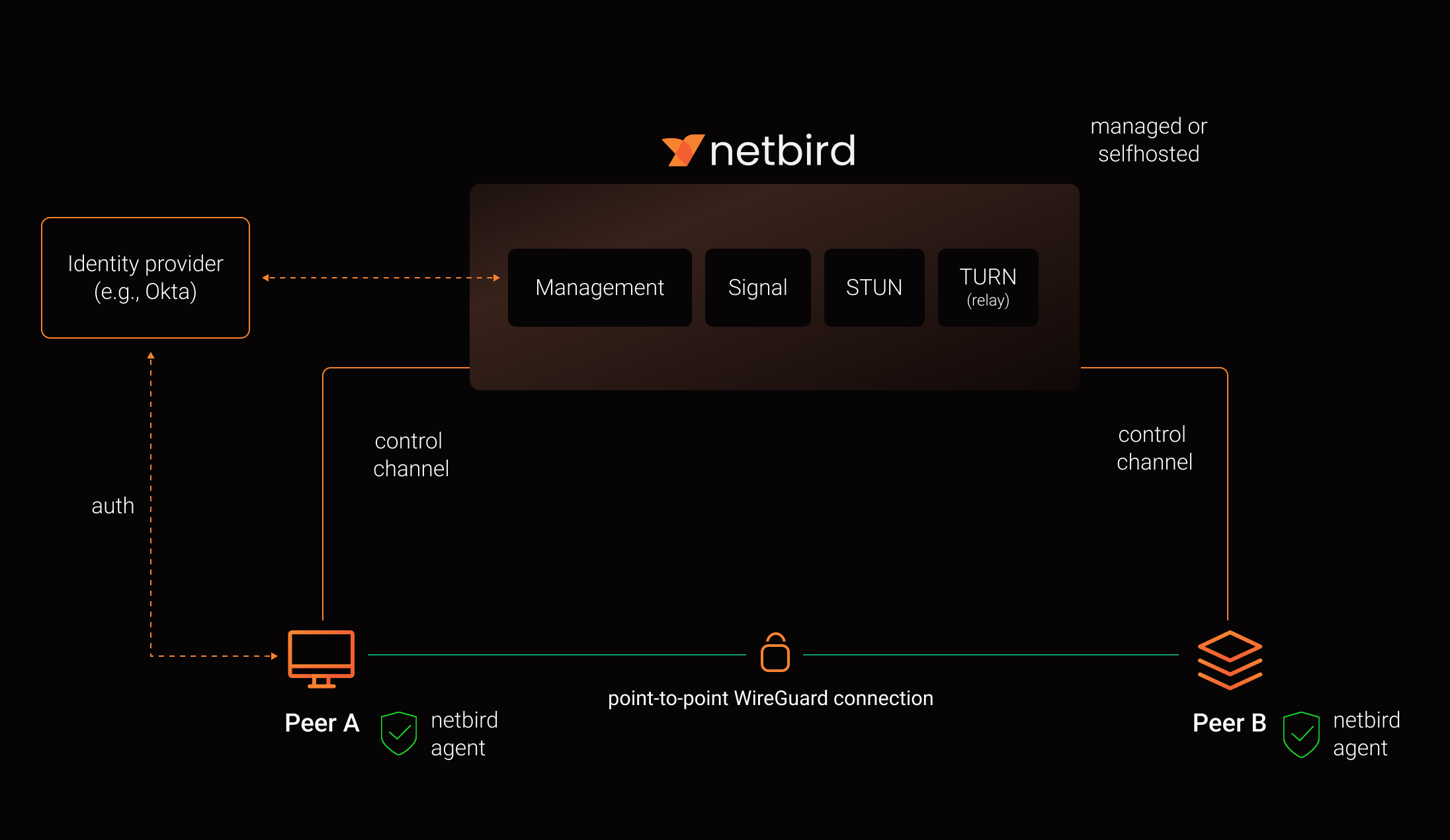
ในระดับ high-level แล้ว NetBird ประกอบด้วย 4 ส่วนหลัก:
Management Service
เป็นสมองของระบบ — จัดการ peer registry, network policies, access control rules, DNS settings และ config ทั้งหมด มี REST API และ Dashboard UI ให้จัดการได้ง่ายๆ ผ่าน browser
Signal Service
ทำหน้าที่ช่วย peer ค้นหากันและแลกเปลี่ยนข้อมูลสำหรับ NAT traversal (ICE candidates) เพื่อให้สร้าง direct P2P connection ได้ ตัว Signal service ไม่ได้ relay traffic — แค่ช่วย handshake ตอนเริ่มต้น
Relay Service (TURN)
เป็น fallback สำหรับกรณีที่ P2P connection ไม่สำเร็จ เช่น เครื่องอยู่หลัง symmetric NAT หรือ corporate firewall ที่บล็อก UDP — traffic จะวิ่งผ่าน Relay server แทน
Client Agent
ติดตั้งบนทุกเครื่อง ทำหน้าที่สร้างและจัดการ WireGuard tunnels รับ config จาก Management Service และเชื่อมต่อกับ peer อื่นๆ
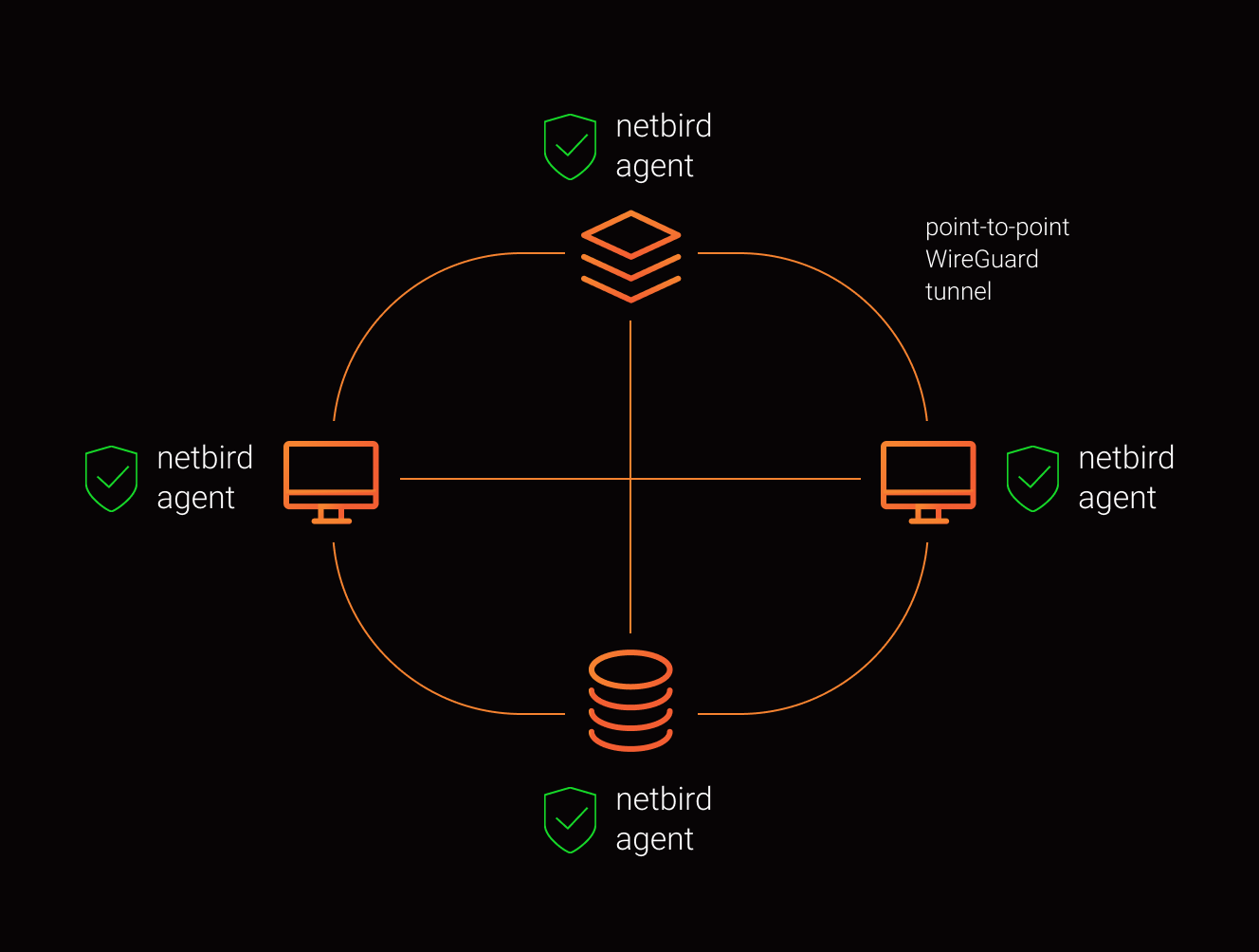
เมื่อ peer ทั้งหมดเชื่อมต่อกันแล้ว จะได้ mesh network แบบนี้:
เทียบกับตัวเลือกอื่น
| NetBird | Tailscale | ZeroTier | OpenVPN | |
|---|---|---|---|---|
| Architecture | P2P Mesh | P2P Mesh | P2P Mesh | Hub-and-spoke |
| Protocol | WireGuard | WireGuard | Custom (ZT) | OpenVPN / TLS |
| Open-source (Client) | Yes (AGPLv3) | Yes (BSD) | Yes (BSL) | Yes (GPLv2) |
| Open-source (Server) | Yes (AGPLv3) | No | Partial | Yes (GPLv2) |
| Self-host | Full | Headscale (unofficial) | Yes | Yes |
| Access Control | UI Dashboard | ACL JSON/HuJSON | Flow Rules | iptables / manual |
| SSO/OIDC | Built-in | Built-in | Requires SSO provider | Plugin / manual |
| Setup Time | นาที | นาที | นาที | ชั่วโมง |
| GitHub Stars | 12k+ | 20k+ | 6k+ | 11k+ |
| License | AGPLv3 | BSD-3 + Proprietary | BSL 1.1 | GPLv2 |
ทำไมผมเลือก NetBird
จากที่ใช้งาน NetBird ที่บริษัทมาสักพัก มีเหตุผลหลักๆ ที่ทำให้เลือก:
- Self-host ได้จริง 100% — สำหรับองค์กรที่มี compliance requirements เรื่อง data sovereignty การ self-host ทุก component ได้เองเป็นเรื่องสำคัญมาก ไม่มี traffic หรือ metadata ไหลออกไป third-party
- UI-based Access Control — ไม่ต้องเขียน JSON ACL เหมือน Tailscale จัดการ network policies ผ่าน Dashboard UI ได้เลย คนที่ไม่ใช่ dev ก็ใช้งานได้
- SSO/OIDC Integration — ต่อกับ Keycloak, Authentik, Google Workspace, Azure AD ได้โดยตรง user login ครั้งเดียวก็ใช้ได้เลย
- Onboarding ง่ายมาก — คนใหม่เข้ามา ติดตั้ง client → login ด้วย SSO → เข้าถึง resource ที่ policy กำหนดไว้ได้ทันที ไม่ต้องแจก config file
- Performance ดี — WireGuard ใน kernel space ทำให้ throughput สูงและ latency ต่ำ รู้สึกเหมือนอยู่ network เดียวกัน
เริ่มใช้งานยังไง
ติดตั้ง NetBird client ง่ายมาก:
curl -fsSL https://pkgs.netbird.io/install.sh | shbrew install netbirdio/tap/netbirdเชื่อมต่อก็แค่คำสั่งเดียว:
netbird upnetbird statusตัวอย่าง output จาก netbird status:
Peers detail: dev-server-01:  NetBird IP: 100.64.0.1  Public key: xxxxxxxxxxxxxxxxxxxxxxxxxxxxxxxxxxxxxx  Status: Connected  -- Loss:            0.00%  -- Latency:         2.34ms  Connection type: P2P  Direct: true
 staging-db:  NetBird IP: 100.64.0.5  Public key: xxxxxxxxxxxxxxxxxxxxxxxxxxxxxxxxxxxxxx  Status: Connected  -- Loss:            0.00%  -- Latency:         45.12ms  Connection type: Relayed  Direct: false
จะเห็นว่า dev-server-01 เชื่อมต่อแบบ P2P (Direct: true) ได้ latency แค่ 2ms ส่วน staging-db ต้องใช้ Relay เพราะอาจอยู่หลัง strict NAT ทำให้ latency สูงกว่า
Use Cases ที่น่าสนใจ
- Remote Access — ให้ทีม remote เข้าถึง internal services ได้อย่างปลอดภัยโดยไม่ต้อง expose port
- Site-to-Site — เชื่อม office หลายๆ แห่ง หรือ data center เข้าด้วยกันผ่าน mesh network
- IoT Device Management — จัดการ IoT devices ที่อยู่หลัง NAT ได้ง่ายขึ้นผ่าน overlay network
- Kubernetes Networking — เชื่อม K8s clusters ข้าม cloud provider หรือ on-prem เข้าด้วยกัน
- Hybrid Cloud — เชื่อม workloads ระหว่าง cloud providers กับ on-prem ได้โดยไม่ต้อง VPN gateway แพงๆ
- Dev Environment — ให้ developer เข้าถึง dev/staging server ได้จากที่ไหนก็ได้
สิ่งที่ต้องรู้ก่อนใช้
แม้ NetBird จะดี แต่ก็มีบางอย่างที่ควรรู้ก่อน:
- Relay latency — ถ้า P2P ไม่ได้ traffic จะ relay ผ่าน TURN server ซึ่ง latency จะสูงขึ้นตาม location ของ relay
- Self-host ต้องเตรียม infra — ต้องมี domain, SSL certificate, และ identity provider (Keycloak, Authentik ฯลฯ) พร้อม
- Client ต้องการ privileges — agent ต้องมี root/admin access เพื่อจัดการ WireGuard interface
- AGPLv3 License — ถ้าจะเอาไป modify และให้บริการ ต้องเปิด source code ตาม AGPLv3 (ใช้ internal ไม่มีปัญหา)
สรุป
NetBird เป็น zero-trust networking solution ที่ตอบโจทย์ทีมที่ต้องการ open-source แบบเต็มตัว self-host ได้ทุก component มี UI สำหรับจัดการ access control ได้ง่ายๆ และใช้ WireGuard สำหรับ performance ที่ดี ถ้าคุณกำลังมองหาทางเลือกแทน traditional VPN หรืออยากได้ alternative ที่ open-source กว่า Tailscale ลอง NetBird ดูครับ